Editing a beneficiary
When a beneficiary's information changes, you can add or edit the beneficiary template. Once you save your changes, all current and future transactions involving this beneficiary will use the new information.
Note: If the template is , you cannot edit the or fields.
While you are editing a beneficiary, a draft version with your changes is saved. This allows you to leave the beneficiary without losing any of the information that you entered. You can then come back later to finish your edits.
The changes you make to the beneficiary are not permanently saved until you click .
Note: If the beneficiary is in the approval queue, you will not be able to edit the information.
 See the video
To edit a beneficiary
- Locate the beneficiary you want to edit.
For more information, see Searching for beneficiaries. - On the left side of the beneficiary's name, click the
 edit icon.
Or choose from the dropdown list.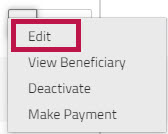
Caution: If the beneficiary is being edited by another user, when you click the edit option or the edit icon, you will see a message telling you who is also editing the beneficiary and the last time they made a change to the beneficiary. You will not be able to see their changes however. If you decide to continue editing the beneficiary, your changes will overwrite their changes. - Choose the section that you want to edit.
If the beneficiary's status is , you can click a section heading to go directly to the section you want to edit. However, if the beneficiary's status is , you will have to move through each step of the process for Creating a new beneficiary. - Make changes to any of the beneficiary fields that are not greyed out, and then click to save the new information you entered.
Note: If you click instead of , you will be returned to the Beneficiaries list. A draft version of your edits is saved for a short period of time (less than 10 seconds), and you will see a message at the top of the page that says "". You can click the word to return to the page you were editing, and your changes will be displayed. If you do not click , your changes are discarded. - When you finish editing the beneficiary, click to permanently save the new beneficiary details.
If your account configuration requires you to authenticate via when creating, or editing a beneficiary, when you click , you will be prompted to select one of the authentication methods you set up. For more information, see Multi-Factor Authentication
The updated beneficiary information is used for all pending and future payments.